
Support
How can we help you today?
Auto clock sync after power-on
You say:
Most NTP issues are firewall issues.
Is that because the default firewall for many/most/some home routers prevents access to NTP servers?
If that is not the case, then it is unlikely that the firewall is the issue (for me anyway) because I certainly haven't modified the firewall of my network. I would argue that 99% of home networks have default firewall settings, which would mean that "most NTP issues" occur within the remaining 1%.
If default firewall settings are likely the issue, there should definitely be some documentation to that effect with at least some basic info on what modifications to a default firewall should occur.
Finally, I poked around some more and for some strange reason, when I rebooted the OpenEVSE WiFi this time (and I had definitely done it previously), the time did set itself. I had tried several other NTP servers, but I believe it is on the same original one (pool.ntp.org).
I would suggest that as the most basic and easiest step to help with this, the "Time" panel in the OpenEVSE GUI should have a note like, "If your time isn't correct, try restarting the OpenEVSE WiFi in the 'Firmware' panel."
Thanks!
@Doug LaRue
- What do you mean by "I switched to manual"? I see nothing to that effect in the settings.
- You aren't making a distinction between rebooting the entire unit and rebooting just the unit WiFi (NOT the house Wifi). (Look in the "Firmware" panel/tab.) Please clarify. Just for reference, my time was "fixed" when I rebooted the unit WiFi.
@Erich Hammer
1. manual mode as in setting time from the browser... manually setting the time instead of going off in the background and getting time from an NTP server somewhere. Might be called Local but figured people would understand.
2. I literally rebooted the OpenEVSE device,, not just software controlled reboot but depowering the whole device and powering up. I don't recall if I've ever tried to just restart the onboard WiFi unit. Who on Earth would setup a system which remembers WiFi SSID and network connections but does not remember network time settings because when a power outage happens is it really expected of people to then go in and restart just the Wifi so that the time/date is set? But if the coders never intended to have network time and relied on RTC and then when RTC hardware was removed and NTP added...

OpenEVSE Support
@Doug LaRue NTP network time settings are saved in the exact same manner as SSID and all other settings. NTP works great for 10s of thousands of people. It is very difficult to troubleshoot a problem that very few people can reproduce. The code is developed by the community, is open source and published on GitHub.
OpenEVSE Support
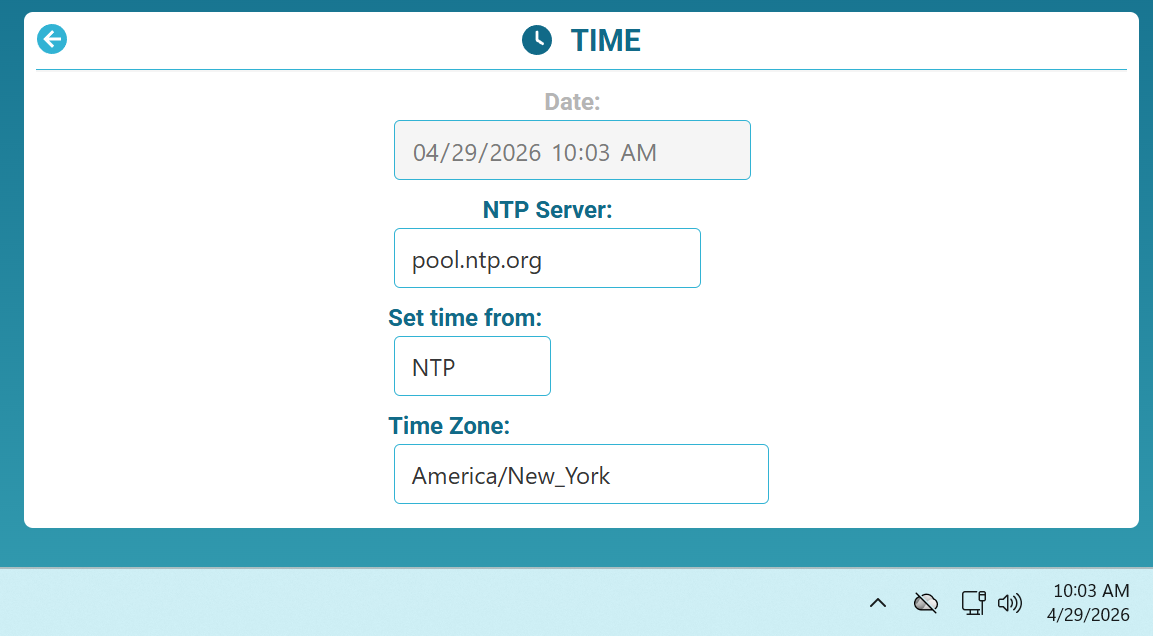 Just for fun... I pulled a station off the shelf and connected to WiFi here in the shop. Once connected time updated automatically, I set the time zone and it immediately updated. The station has the correct time after reboot.
@Doug LaRue What I'm trying to understand is how you are accomplishing manual time setting. I see nothing that would do that or allow for either receiving the time from the browser or typing in the time by hand.
Also, it's not that the NTP settings are being forgotten. I suspect the root of the problem is that the time is set ONLY when the WiFi service/daemon is started up, and it is possible the time check is attempted before the WiFi connection is fully established. When house power goes down the network in general can take up to 2 minutes before being fully ready. The OpenEVSE boots up much faster than that, and if it never checks for the time server again, it will never set the time.
In my case, either I don't have an internal battery backup to maintain the time, or the battery has died, so the time is always reset to "0". As luck would have it, I had a brief power outage just this morning. Of course the time was reset, but I logged back in, went to Settings -> Firmware and rebooted the WiFi (NOT the whole device). The time was then set correctly, so it was NOT a firewall or network issue. You should try that too and report back.
I'm including this information in case any of the developers see to it to set up either a delayed time check on boot. What would the harm be to wait 300 seconds after boot to check on the time? Alternatively, have it check periodically. Once a day wouldn't hurt either. Either one of those would certainly fix the issue I am having.
OpenEVSE Support
@Erich Hammer The developer(s) do not see anything here. The main contributor for the WiFi firmware is active on the OpenEVSE Discord (@_Jez) https://discord.com/invite/Y3ftbUd4rR
Issues and suggestions on tracked and documented on GitHub https://github.com/OpenEVSE/openevse_esp32_firmware
I am not a developer but I had Grok Review the code and give a summary of NTP.
NTP (implemented as SNTP via MongooseSntpClient) in the OpenEVSE ESP32 firmware updates periodically every 8 hours by default. The logic is in src/time_man.cpp and src/time_man.h (part of the TimeManager class, which runs as a MicroTasks::Task).Key details from the code:
- Update frequency / interval: cppThis can be overridden at compile time. After a successful time fetch, the next poll is scheduled for millis() + TIME_POLL_TIME.
#defineTIME_POLL_TIME8*60*60*1000// 8 hours in milliseconds - When updates happen:
- Immediately when the NTP/SNTP host is set (setHost()) or SNTP is enabled (setSntpEnabled(true)), via checkNow() which forces _nextCheckTime = millis().
- Periodically every 8 hours (or the overridden TIME_POLL_TIME) only if the network is connected (net.isConnected()).
- On error (e.g., failed SNTP query): retries after 10 seconds (_nextCheckTime = millis() + 10*1000).
- The main loop() in TimeManager checks the conditions and calls _sntp.getTime(_timeHost, callback) when it's time to poll.
- Other behavior:
- The host/server is configurable via setHost(const char*) (stored in _timeHost).
- SNTP can be toggled on/off with setSntpEnabled(bool).
- On success, the retrieved struct timeval is applied with settimeofday, optionally pushed to the OpenEVSE hardware, and a JSON time-change event is triggered.
- Timezone is set via setTimeZone(String) (uses the TZ environment variable).
In short: the firmware does not do continuous or frequent NTP polling (e.g., every few minutes). It does a full SNTP sync on initial setup / config changes, then every 8 hours while the network is up, with a short back-off retry on failures.
raw.githubusercontent.com +1If you override TIME_POLL_TIME or change the host/enabled state at runtime (via web config, MQTT, etc.), the next update will happen immediately or at the new interval. The exact default host and whether SNTP starts enabled by default would be in the initialization code (e.g., net_manager.cpp or app_config*.cpp), but the core polling behavior above is fixed in time_man.cpp.
OK. Well, I did say "I suspect". :-)
That was just based on my observation that it didn't update the time on it's own even after many weeks, but immediately did so upon rebooting the WiFi. I'll move my observations to GitHub.
Thanks.
On boot-up what should be happening is NTP failures sets TIME_POLL_TIME to 1 minute period( 60*1000 ) and on success sets it to 8 hours( 8*60*60*1000). It would also be nice of NTP failures get logged so when an NTPD server is set and it fails we can see it in the log and maybe why it failed(server not found, network connection failure, etc ).
I have some other things going on with the openEVSE wifi firmware because even when it is online(on my network) my network does not show it in the client list. It's currently disconnecting almost daily and I have to force my network to use a different Wireless Access Point to get it connected again even when the other WAP is on the other side of the house. Today I changed my DHCP setting for that device from ALWAYS to lease expiration of 1 hour to see if that type of disconnecting forces on-line stability.
Martin Pritchard
Having had surprisingly many power outages in the past few weeks I've noticed that the OpenEVSE won't resync the time after the power returns. Whether this is because it syncs at a much later time and I'm too impatient, I don't know.
If (as long as time sync is set to "automatic" the charger resynchronised it's time every day at 12:05am, it would mean that five minutes after power-up (when it'll have gone back to midnight at whatever date it says it is, I can't remember) it'll resynchronise. Perhaps this would even go so far as to render the backup battery redundant?
1 person likes this idea