
Support
How can we help you today?
Auto clock sync after power-on
It has to be on the network/wifi because I posted pics from a browser on my LAN on the same wifi network/WAP. I also use the phone app/browser page. So it must be connected.
Odd yours works and mine does not.

OpenEVSE Support
@Doug NTP was added about 6 years ago in 3.1.0 on Apr 29, 2020 and was last changed almost 3 years ago. It is functioning as expected on the test unit I just set up in the shop as well as on 2 units I am running at home. It does not appear to be a bug in the firmware or I would see the same issue as you are seeing.
last change was in 5.0.0 Sep 19, 2023
fix in 4.2.2 Apr 12, 2023
- No longer endlessly loop when switching from NTP -> Manual time by @jeremypoulter in #531
Fix in 4.1.1 Dec 13, 2021
- Fix NTP Not updating automatically #194
Fix in 4.1.0 July 22,2021
- Fix NTP update #222
Is there anything in the settings which would stop it from working?
This unit is a JuiceBox v2 upgrade board I purchased last year and this hasn't work since day 1.
I was running it off a 12A 120VAC outlet at first and a weak GFCI was causing the circuit to turn off and when OpenEVSE booted back up I got no updated time. I've upgraded the firmware and it's not worked and I built the firmware off github and uploaded that it still ntp hasn't worked.
This is a software issue for sure, ie not hardware, so I'm at a loss for why it works on other systems yet not mine. I will retest ntp updates on each of my WAPs to verify my laptop can see the ntp servers.
I've installed openntpd on my laptop and checked status and it's functioning getting to the servers and putting my laptop hostname into OpenEVSE still didn't work so that's why I believe the issue is within the OpenEVSE setup/device.
Again, it sounds like you saw updates and even tested 3 builds so the firmware code works.
Maybe I'll delete my config and try to see if that changes something which changes ntp to working.
Also why I checked MQTT data to see that sntp_enable was true.
OpenEVSE Support
@Doug
The things that cause it to not work are typically no internet and firewall rules.
Using initial configuration mode OpenEVSE_xxxx SSID and IP address 192.168.4.1.
A firewall that blocks NTP all together or has just a specific rule to a specific server.
There are no settings on the EVSE that affect NTP other than the ones on the Time Page.
it's just really odd because all of our devices use ntp on our WAP incuding esp32 devices I've made like tide clocks and LoRaWAN gateways, rPi's besides all the computers in the home.
just ran a test on the openntpd I installed on my machine in the house and it shows it's getting data from pool.ntp.org, time.google.com, 0.debian.pool.ntp.org and 1.debian.pool.ntp.org
So it's obvious the wifi and networking routers are not blocking ntp since this machine is on the same WiFi network as the OpenEVSE esp32.
sudo ntpctl -s all
16/20 peers valid, clock unsynced
peer
wt tl st next poll offset delay jitter
45.84.199.136 from pool pool.ntp.org
1 10 2 13s 30s -10.625ms 176.720ms 34.526ms
23.150.41.122 from pool pool.ntp.org
1 10 2 14s 34s -8.545ms 74.907ms 37.820ms
172.233.177.198 from pool pool.ntp.org
1 9 2 0s 34s -4.720ms 93.684ms 33.135ms
142.202.190.19 from pool pool.ntp.org
1 10 2 16s 33s -0.129ms 32.850ms 4.058ms
2001:4860:4806:: from pool time.google.com
1 2 - 15s 15s ---- peer not valid ----
2001:4860:4806:c:: from pool time.google.com
1 2 - 15s 15s ---- peer not valid ----
2001:4860:4806:8:: from pool time.google.com
1 2 - 15s 15s ---- peer not valid ----
2001:4860:4806:4:: from pool time.google.com
1 2 - 15s 15s ---- peer not valid ----
216.239.35.0 from pool time.google.com
1 10 1 10s 31s -1.957ms 31.043ms 5.577ms
216.239.35.12 from pool time.google.com
1 10 1 22s 33s -7.043ms 60.796ms 43.391ms
216.239.35.8 from pool time.google.com
1 10 1 23s 33s -0.056ms 29.183ms 5.057ms
216.239.35.4 from pool time.google.com
1 10 1 23s 32s -0.381ms 28.092ms 5.330ms
99.28.14.242 from pool 0.debian.pool.ntp.org
1 10 1 14s 32s -9.616ms 87.154ms 32.270ms
66.59.198.178 from pool 0.debian.pool.ntp.org
1 10 2 18s 33s -6.007ms 88.751ms 31.415ms
45.55.58.103 from pool 0.debian.pool.ntp.org
1 10 2 14s 32s -4.359ms 102.161ms 26.208ms
23.186.168.126 from pool 0.debian.pool.ntp.org
1 10 2 7s 30s -11.485ms 61.889ms 43.769ms
108.61.56.35 from pool 1.debian.pool.ntp.org
1 10 2 9s 30s -7.693ms 100.173ms 27.318ms
45.63.54.13 from pool 1.debian.pool.ntp.org
1 10 2 15s 31s -1.842ms 23.410ms 7.173ms
216.229.0.50 from pool 1.debian.pool.ntp.org
1 10 2 13s 31s -12.944ms 86.933ms 32.633ms
172.233.177.198 from pool 1.debian.pool.ntp.org
1 10 2 20s 33s -5.323ms 95.098ms 31.088ms
all signs point to ntp working inside our Wifi network and I reset my OpenEVSE to factory defaults, setup my wifi( same network as the rest of the house ) and setup Time and ntp service but still no time update on OpenEVSE. Stranger things?
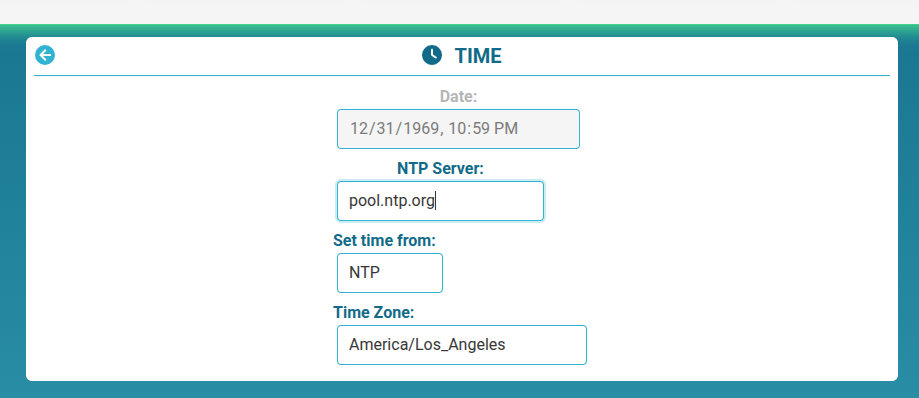
OpenEVSE Support
@Doug. Do you have a phone with cellular data you can use as a hotspot? If yes, turn your phone into a hotspot and have your station join the phone hotspot. Does NTP work in this configuration?
Thanks @MikeK for confirming I'm not crazy. :-) As for it getting the correct time when you clicked on Manual update mode, well that pulls the time from your browser which pulls it from the computer you are running the browser on. There is definitely something weird going on with the NTP section of the WiFi firmware because not only does it sometimes not get NTP time, it doesn't do it on reboot sometimes and it doesn't periodically get it nor log that it's having problems getting the time.
I had even setup a ntpd time server on a local computer and it wouldn't pull time from it but after changing my Wifi AP on the OpenEVSE to test if a moble WAP helped, once changing it back to my home WAP it started working and even worked across a forced reboot.
I've got my WAP only 20' away from my OpenEVSE but around a couple of corners yet for some reason my OpenEVSE would drop offline and never reconnect. I've made some setting changes in my WAP specifically for the OpenEVSE device like setting only 2.4GHz and running a channel optimiation routine.
It's a more serious bug when things like your scheduled charge doesn't happen and you're left with a car that can't get you to work and back or something like that.
I am also not getting time updates. I have no idea how long it has been like that as I don't check it often, but it currently says it is February 7, 1970.
I'd change it to "manual", but I don't see that option. Is it in the web interface somewhere?
Thanks!
I should add that when I put in a time server and hit enter, a green checkmark briefly appears. I would assume that means it has checked that it can reach the server. Is that not the case?
OpenEVSE Support
@Erich Manual Browser sync was an option 5+ years ago when the stations had no WiFi and a RTC chip and battery. It is not applicable anymore. Most NTP issues are firewall issues. Check that NTP is allowed by your internet firewall.
I can't say that it is definitely not the firewall, but all the other devices in my house connected through the same router don't have any issues with knowing the time after power outages.
I posed my question because of the posts just a month about by @MikeK and @DougLaRue about using "manual update mode"/"manual time entry". If that hasn't been around for 5+ years, what are they talking about?
What is the meaning of the green check that appears when the NTP server is changed? Is that just to say it has been updated, or that the NTP server has been pinged and is reachable?
I know when I have troubleshoot my network, rebooting the cable modem can take a couple minutes, and the router isn't particularly fast about establishing a connection either. Thus, if the OpenEVSE only checks time on boot, it very well might not be able to reach the NTP at that time.
It seems to me that having a button in the time interface to update time on demand would be both useful and easy to implement. It would also allow folks like me who aren't sure about their firewall to at least update the time even if it is manual.
IMO the green "check" it shows means nothing but I've not followed the code. What have done so many times is set the ntp server, see the check show green and don't see any time change. Then I've rebooted and didn't see any time update/change. I would ONLY see a time change when I switched to manual and then it would repeatedly show the correct time until a reboot and then it was back to Epoch zero day/hour.
The wifi setup on OpenEVSE has really sucked for me. Besides the ntpd stuff I've not had access to my opense-xxxx.local address for days because it periodicallly goes offline, doesn't present a local WAP and I have to go into my router to tell it to switch to one of the other routers in the mesh, often at the back of the house just to get it to reconnect. Otherwise I have to go out and throw the breaker and restart the OpenEVSE device to get it to connect to WiFi.
It's not been fun but when it is working, it's made charging our Leaf and other EVs much easier since we can set exactly how many kWh to give them in order to get to 80% SOC.
Martin Pritchard
Having had surprisingly many power outages in the past few weeks I've noticed that the OpenEVSE won't resync the time after the power returns. Whether this is because it syncs at a much later time and I'm too impatient, I don't know.
If (as long as time sync is set to "automatic" the charger resynchronised it's time every day at 12:05am, it would mean that five minutes after power-up (when it'll have gone back to midnight at whatever date it says it is, I can't remember) it'll resynchronise. Perhaps this would even go so far as to render the backup battery redundant?
1 person likes this idea